I want to use REST API with Sharepoint, i'm not here talking about using graph API.
I created an Azure Application and selected SHarepoint API to set authorizations: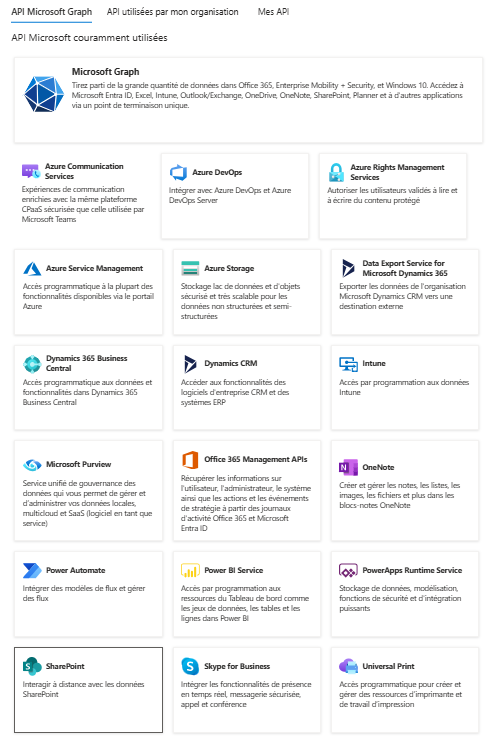
I created secret for OAuth 2.0. Here are the authorizations I set for an application. it should not involve any user account ...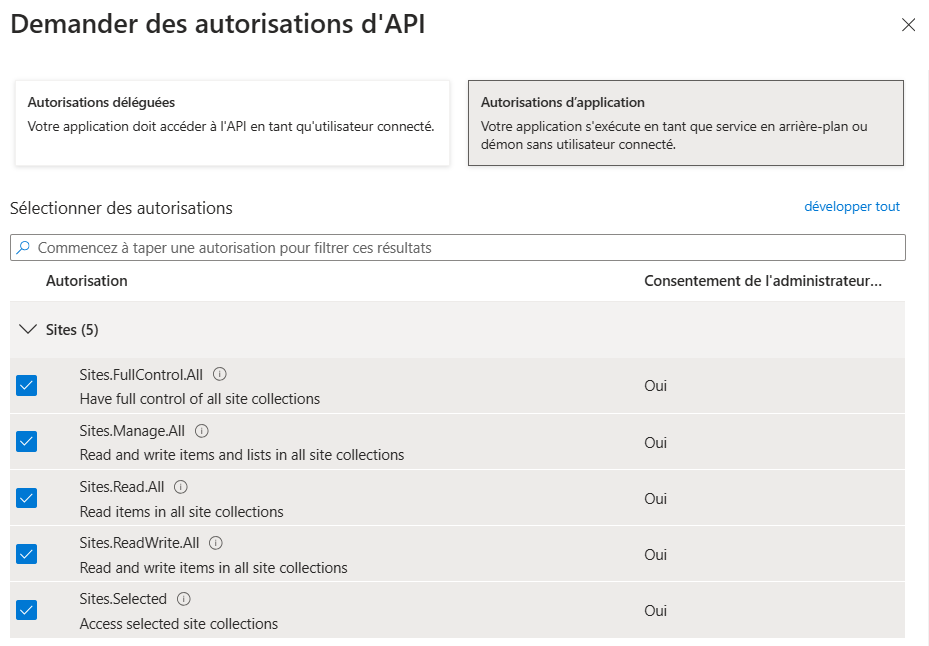
Now in a java application, for authentication, i'm using msal4j dependency:
<dependency><groupId>com.microsoft.azure</groupId><artifactId>msal4j</artifactId><version>1.17.2</version></dependency>I also have an AuthProviderRequest object:
@Test@Order(2)void restAuthenticate() throws Exception { // HttpConnectionProvider IAuthenticationResult result = sharepointManager.authenticate(restGraphProviderRequest); System.out.println(result.accessToken()); String endpoint = "https://{{tenantName}}.sharepoint.com/sites/{{siteName}}/_api/web/lists/GetByTitle('{{libName}}')/items"; HttpRequest request = HttpRequest.newBuilder().uri(URI.create(endpoint)) .header(RequestConstants.HTTP_HEADER_AUTHORIZATION, RequestConstants.HTTP_HEADER_AUTHORIZATION_BEARER_PREFIX + result.accessToken()) // .build(); HttpClient client = HttpClient.newBuilder().build(); HttpResponse<String> response = client.send(request, HttpResponse.BodyHandlers.ofString()); System.out.println(response);}Here my TENANT_AUTHORITY = "https://login.microsoftonline.com/{{ sharepointTenantId }}";And my SCOPE_MS_GRAPH_DEFAULT = "https://{{ tenantName }}.sharepoint.com/.default";
if i run my unit test i do retrieve a JWT token... I decoded the token to check if it looked correct.. for a Sharepoint graph application aud should be : "https://graph.microsoft.com",
{"aud": "00000003-0000-0ff1-ce00-000000000000","iss": "https://sts.windows.net/{{ tenantId }}/","iat": 1731857052,"nbf": 1731857052,"exp": 1731860952,"aio": "k2BgYCgvOXulrW5bcsKiANamCU47NKdfuaHRkb3ilVrLSZE73MYA","app_displayname": "sharepointRest ","appid": "3a0aba82-2805-4dd7-b9f9-41c854199262","appidacr": "1","idp": "https://sts.windows.net/{{ tenantId }}/","idtyp": "app","oid": "...","rh": "...","roles": ["Sites.Manage.All","Sites.Read.All","Sites.ReadWrite.All","Sites.FullControl.All" ],"sid": "...","sub": "...","tid": "...","uti": "...","ver": "1.0","xms_idrel": "7 24","xms_pftexp": 1731947352}it seems here that i can do have a valid token i could use with rest API in sharepoint.
Here is the response:
- When running unit test i have a 401 response.
- When testing Url with tokenn i have: Unsupported app only token.
I tried to add authorization to application in Graph Explorer with a POST request to the following endpoint: https://graph.microsoft.com/v1.0/sites/{{ tenantName }}.sharepoint.com:/sites/{{ siteName }}
with following payload:
{"roles": ["write","read","delete","owner" ],"grantee": {"@odata.type": "microsoft.graph.aadApplication","id": "3a0aba82-xxxx-xxxx-xxxx-xxxxxxxxxxxx" }}After update:
- When running unit test i have a 401 response.
- When testing Url with tokenn i have: Unsupported app only token.
I also tried to use OKHttp to authenticate:
public class RestAuth { // Azure AD and SharePoint Configurations private static final String CLIENT_ID = "myClientId"; private static final String CLIENT_SECRET = "myClientSecret"; private static final String TENANT_ID = "myTenantId"; private static final String RESOURCE = "https://myTenantName.sharepoint.com"; private static final String SITE_NAME = "mySite"; // OkHttp client private static final OkHttpClient client = new OkHttpClient(); public static void main(String[] args) { try { String accessToken = getAccessToken(); System.out.println(accessToken); if (accessToken != null) { getSiteLists(accessToken); } else { System.out.println("Failed to fetch the access token."); } } catch (Exception e) { throw new RuntimeException(e); } } // 1. Retrieve an Access Token private static String getAccessToken() throws IOException { String tokenEndpoint = String.format("https://login.microsoftonline.com/%s/oauth2/token", TENANT_ID); RequestBody formBody = new FormBody.Builder() .add("grant_type", "client_credentials") .add("client_id", CLIENT_ID) .add("client_secret", CLIENT_SECRET) .add("resource", RESOURCE) .build(); Request request = new Request.Builder() .url(tokenEndpoint) .post(formBody) .header("Content-Type", "application/x-www-form-urlencoded") .build(); try (Response response = client.newCall(request).execute()) { if (response.isSuccessful()) { String responseBody = response.body().string(); JSONObject json = new JSONObject(responseBody); return json.getString("access_token"); // Extract the access token } else { System.err.println("Failed to get access token: " + response.code() +" - " + response.message()); System.err.println(response.body().string()); return null; } } catch (Exception e) { throw new RuntimeException(e); } } // 2. Get the Lists from the SharePoint Site private static void getSiteLists(String accessToken) { String siteUrl = String.format("%s/sites/%s/_api/web/lists", RESOURCE, SITE_NAME); Request request = new Request.Builder() .url(siteUrl) .get() .header("Authorization", "Bearer " + accessToken) .header("Accept", "application/json;odata=verbose") .build(); try (Response response = client.newCall(request).execute()) { if (response.isSuccessful()) { String responseBody = response.body().string(); System.out.println("Site Lists: " + responseBody); } else { System.err.println("Failed to fetch site lists: " + response.code() +" - " + response.message()); System.err.println(response.body().string()); } } catch (Exception e) { throw new RuntimeException(e); } }}I obtain: Failed to fetch site lists: 401 -Unsupported app only token.
the decoded token is absolutelly similar to previous one: same aud, iss, roles...
I checked access control in admin sharepoint center :
- for unmanaged devices, i set authorizations
- i activated access for legacy authentication
i really don't get what is wrong here. thanks